Your files,
finally organized.

FileCab automatically organizes your files the way you want. Preview every change before anything moves. Your files, your rules.

macOS Silicon + Intel Windows x64 100% local
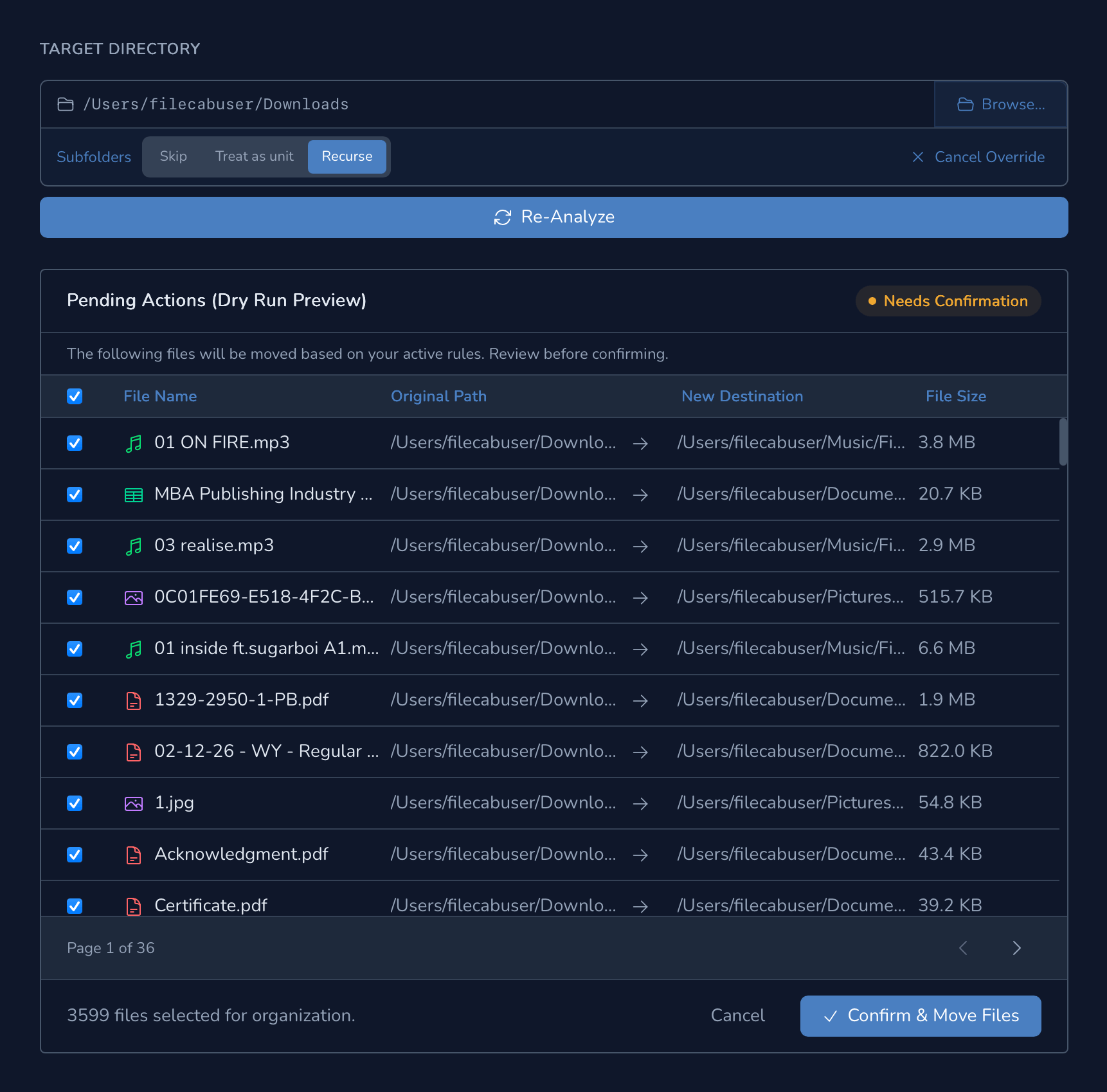
FileCab plan preview screen showing proposed file moves
Safe by default: System files are protected by default
Preview before you move. Undo after you do.
100% local. No accounts. No cloud.
Everything you need.
Nothing you don't.

Powerful rule engine. Safe defaults that protect what matters. Full control over the rest.

No Account Required
Everything is local. No telemetry. No sign-up. Your filesystem, your business.
Rule-Based Organization
Match files by extension, MIME type, size, date, or keywords. Stack conditions with AND/OR logic.
Dry-Run Preview
See exactly what will move and where before committing a single change.
Quick Clean
One click to clean your Desktop, Downloads, or Documents instantly using your saved rules.
Real-Time Auto-Watch
Monitor folders so that files are organized automatically the moment they arrive.
Undo Any Session
Made a mistake? Undo your sessions to restore your files exactly as they were. No lost work.
Safe by Default
System files are protected by default, deleted files go to Trash first, and hard delete is opt-in only.
Deep MIME Detection
Looks beyond file extensions. Reads file contents to correctly identify and categorize disguised files.
Import / Export Rules
Backup and import your rules so switching machines means zero lost configuration.
Conflict Handling
Choose rename, skip, or overwrite when destination files collide. No silent surprises.
OS Notifications
Get notified when scans finish or auto-watch organizes files in the background.
Free Updates
Updates are always free. Install them yourself or let FileCab handle it quietly in the background.

Rules that actually make sense.

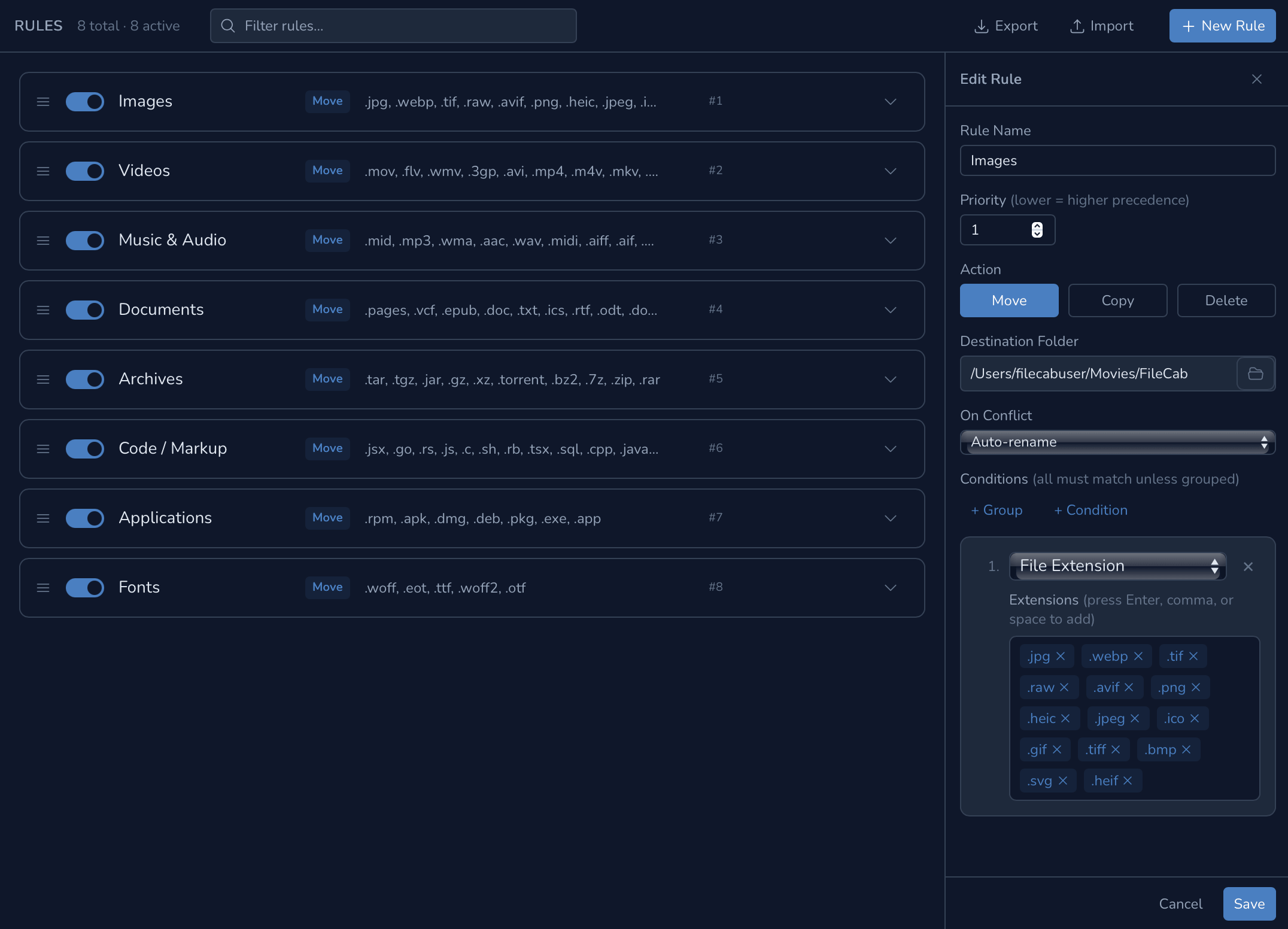
Define exactly how files should be matched and where they go. Combine conditions with AND/OR logic, then set a destination. Stack multiple rules; FileCab applies them in priority order.

  • Match by extension, MIME type, size, date modified, or filename keywords
  • Stack conditions with AND / OR, as precise or as broad as you need
  • Rules are prioritized: higher rules win when multiple match the same file
  • Export and import rules as JSON or YAML, shareable between machines
FileCab Rules Editor showing rule conditions and destination settings

See every move before it happens.

Pick a folder, FileCab scans it against your rules, and shows you a full preview (by default) before anything moves.

1
Pick a folder
Select any folder to scan, or hit Quick Clean to target Desktop, Downloads, or Documents in one click.
2
FileCab scans
Your rules are applied to every file. A full preview plan is generated. Nothing moves yet.
3
Review the plan dry-run default
See each proposed move. Deselect anything you want to skip. Inspect destinations before committing.
4
Confirm & undo
Files move. The session is journaled. Undo is available immediately if you change your mind.

Get FileCab

Free to download. Runs locally. No account, no cloud, no catch.

Latest release: v0.1.1

FileCab is free. Your support helps keep it free for everyone

☕ Support Future Development